
AI coding workflow
Bring structure and visibility to agentic development.
One guided process for developers. A clear view of the work for team leaders.
A guided Agentic PDLC
Move each task from definition to delivery through clear stages, reviews, and validation.
One workflow across AI coding tools
Work through a consistent interface that reduces tool-specific complexity as your coding tools evolve.
Visibility into every task
See which tools were used, the tokens consumed, and where human review took place—all linked to the task.
Runs locally. Keeps you in control.
Savyre runs in your local development environment, with your source code and workflow files kept on your machine.
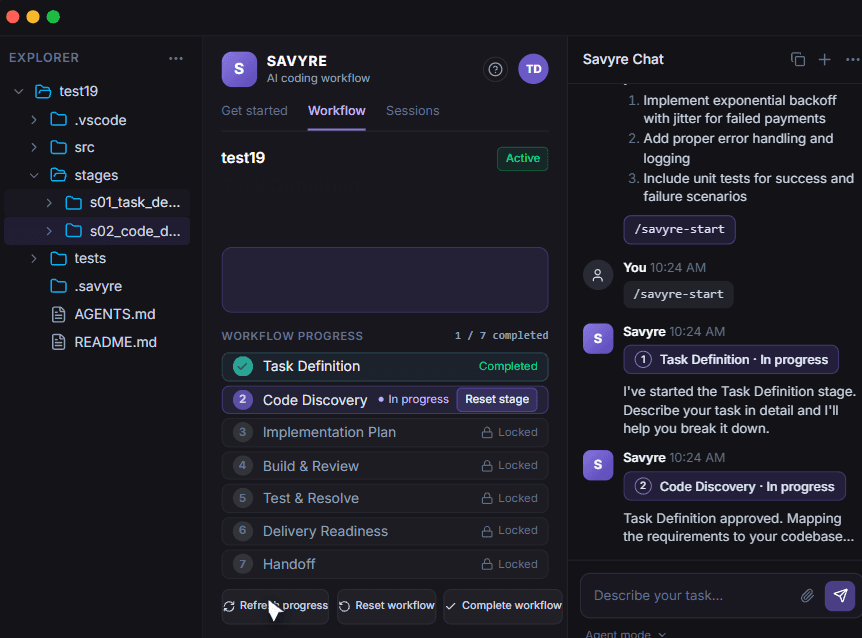
Works in your IDE, alongside your AI coding assistant.
VS Code · Cursor · AntigravityClaude Code · GitHub Copilot · Codex
The Agentic PDLC
From task definition to delivery—one guided workflow.
Give every task a clear path, with defined outputs and review points along the way.
Clarify the goal, requirements, and acceptance criteria.
Example task
Add payment retries
01 / Task Definition
Define the goal, requirements, and acceptance criteria.
Align on what to build, why it matters, and how we'll know it's done.
Task brief
Goal
- Retry transient payment failures safely.
Requirements
- Use exponential backoff with jitter.
- Limit to a maximum of three retries.
- Preserve idempotency across retry attempts.
Acceptance criteria
- Transient failures recover successfully.
- Permanent failures stop retrying.
- Duplicate charges are prevented.
Developer review
Confirm the scope and acceptance criteria.
Illustrative example
Tools, visibility & control
Works in your environment. Gives your team clarity.
Keep your development tools, understand AI usage, and stay in control of the work.
Team workflow overview
Project activity, AI usage, and review artifacts in one view.
Token usage shown for the listed task during this period.
Artifact preview · Add payment retries
View task detailsTask brief
Goals, context, and acceptance criteria
Implementation plan
Approach and task breakdown
Review notes
Feedback and follow-ups
Source code and workflow files remain in the local workspace. Team visibility uses task-level activity and usage information.
Your tools. One workflow.
Work in supported IDEs alongside your coding assistants through a consistent Savyre workflow.
Visibility into the actual task.
Connect tool usage, token consumption, workflow progress, and review activity to the work being done.
Runs locally. Keeps you in control.
Savyre runs in your development environment, with source code and workflow files kept on your machine.
Developer review at key stages.
Review the approach, validate changes, and decide when the work is ready to move forward.
Pricing
Try the full workflow before you commit.
Explore AI Coding Workflow with full feature access during your 14-day free trial.
AI Coding Workflow
One guided process for developers. Visibility for team leaders.
- Guided Agentic PDLC
- One workflow across coding tools
- Task-level usage and review visibility
- Local execution and workflow artifacts
Full feature access for 14 days.
Plan your team's access
$8.99per developer / month
Paid access after your trial.
1 developer selectedNumber of developers
Questions about team pricing? Contact us →
Get started
Bring structure to your next development task.
Create your account, connect your development environment, and start a guided workflow.
View pricing- 1
Create your account
Sign up as an individual or a team.
- 2
Install & sign in
Open Savyre in your IDE, install the extension, and sign in.
- 3
Open your project
Use your existing codebase in your local development environment.
- 4
Start the workflow
Define your task and follow the seven guided stages.
- 5
Review & export
Complete final checks and export workflow artifacts and metadata.
Open Savyre in your IDE
Already have an account? Choose your IDE to continue setup.
Your IDE
Choose VS Code or Cursor.
Need installation help?
Install the extension if prompted, then sign in to Savyre.
FAQ
Frequently asked questions
Your coding assistant helps carry out the work. Savyre adds a guided Agentic PDLC—from task definition and code discovery to planning, building, review, testing, and handoff. It connects that workflow to the actual task, giving team leaders visibility into AI usage and human review.